
Updated August 2026. Poker calculator apps have changed a lot. A good setup can now include a phone odds calculator, a free web calculator for quick checks, range software for study, an ICM tool for tournaments, and a bankroll tracker to measure whether your work is paying off.
Use this guide to choose the right tool for the job: quick hand odds, mobile equity checks, range study, Omaha support, and tournament decisions.
A useful poker app setup is simple: calculators help you understand one hand, study apps help you train decisions, and a bankroll tracker helps you see whether the work is showing up in your results.
Track your own results: The Poker bankroll tracker app guide explains what Poker Stack records, when an app beats a spreadsheet, and how to review sessions with less guesswork.
Track whether your study is working
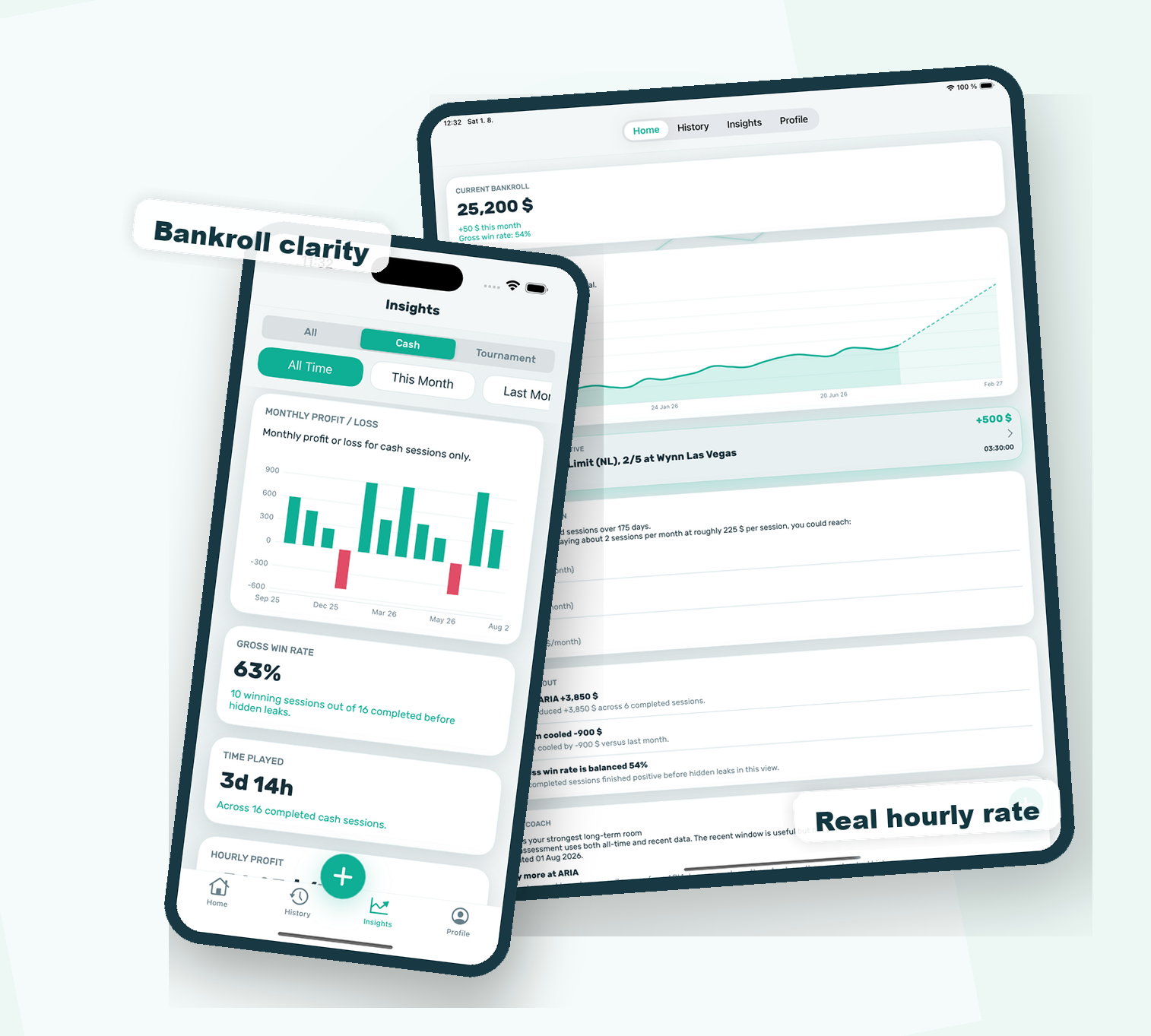
A calculator can show equity in one hand. Poker Stack shows the bigger pattern: buy-ins, cashouts, bankroll, win rate, and session history. After you study a spot, log the next session and see whether the work changes your real results.
Quick picks
| Icon | Need | Best pick | Why |
|---|---|---|---|
 | Best mobile poker odds calculator | PokerCruncher | Strong equity engine, range support, and versions for iOS and Android. |
 | Best iPhone/iPad calculator for mixed games | Poker Legend 5 | Useful for players who want Holdem, Omaha, Big O, high-low, or double-board variants. |
 | Best Android practice app | Holdem Lab 2 | Good for quick Holdem hand equity checks on Android. |
 | Best newer iOS mixed-game option | Poker Geek Odds Pro | Worth comparing if you want a newer mobile interface and extra game formats. |
 | Best free web odds calculator | CardPlayer odds calculator | Fast, free, and easy to use in a browser. |
 | Best range study tool | Flopzilla Pro | Better for range-vs-board study than a simple mobile odds app. |
 | Best free desktop equity tool | Equilab | Useful for Holdem equity and range work without paying for a modern solver. |
 | Best solver-based study platform | GTO Wizard | Strong once you already understand equity, pot odds, ranges, and bet sizing. |
 | Best tournament ICM calculator | ICMIZER | Built for push/fold, final-table, bounty, and payout-pressure study. |
Use poker calculator apps for study, not cheating
A poker odds calculator is a study tool. It helps you check whether your instinct about a hand was right. It is not something you should use as real-time assistance in an online hand unless the site rules clearly allow it.
Most serious poker rooms restrict tools that tell you what to do during play. Use these apps after a session, while reviewing a hand, or when training away from the table. That is also where they help the most. You remember more when you calculate first, then use the app to check your answer.
Best poker odds calculator apps in 2026
1. PokerCruncher
PokerCruncher is still the best all-around poker odds calculator app for serious mobile study. It is not the prettiest tool, but it is powerful. You can calculate equity, test ranges, and review spots in a way that basic free calculators cannot match.
Pick PokerCruncher if you play Holdem seriously and want one app that can grow with you. It is especially useful if you already understand the basics of poker equity and want to study hand-vs-range situations.
2. Poker Legend 5
Poker Legend 5 is worth a look if you play more than standard No-Limit Holdem. It supports several poker variants, including Omaha-style games, which makes it more useful for players who study PLO, Big O, high-low games, or home-game formats.
This is not the easiest first app for a complete beginner. For mixed-game players, though, it solves a real problem: many simple poker odds apps only care about Texas Holdem.
3. Holdem Lab 2
Holdem Lab 2 is a practical Android option for players who want fast hand equity checks. It is more focused than a full study suite, which can be a good thing if you just want to test common Holdem spots.
Use it to check preflop all-ins, flop equity, and turn/river situations after a session. If you want deeper range work, use it alongside a desktop or web tool.
4. Poker Geek Odds Pro
Poker Geek Odds Pro is a newer iOS option that appears built for players who want more game formats than a basic Holdem calculator. It is useful to compare against PokerCruncher if you care about mixed-game coverage or a newer mobile interface.
PokerCruncher is still the safer default for most players, but Poker Geek Odds Pro belongs in the current conversation.
5. Free web poker odds calculators
If you only need a quick answer, you may not need to install an app at all. The CardPlayer poker odds calculator and the PokerNews poker odds calculator are simple browser tools for checking common Holdem spots.
They are not as flexible as a paid app, but they are enough for many beginner questions: two hands all-in, a draw against a made hand, or a quick flop equity check.
Best poker calculator software for deeper study
A phone app is enough for quick hand checks, but serious study usually needs stronger poker software. These tools are better when you want to work with ranges, solver outputs, tournament pressure, or full hand reviews.
Flopzilla Pro
Flopzilla Pro is one of the best tools for learning how ranges connect with boards. Instead of asking, "what are my odds against one exact hand?", you can ask better questions: how often does villain have top pair, a flush draw, two pair, or air on this flop?
That is a big step up from basic hand calculators.
Equilab
Equilab is a classic free equity calculator for Holdem. It is older, but still useful if you want a desktop tool for range-vs-range study without paying for a modern solver.
Use it when you want to understand whether a call was close, how a range performs against another range, or how much equity a draw really has.
GTO Wizard
GTO Wizard is not a simple odds calculator. It is a modern study platform for solver-based strategy. It is useful once you already understand equity, pot odds, ranges, and bet sizing.
Beginners should not start here. Learn the math first, then use GTO Wizard to study how strong players structure decisions.
ICMIZER
ICMIZER is for tournament players. It helps with push/fold spots, final-table pressure, bounty decisions, and payout structures. A normal odds calculator cannot tell you whether tournament risk makes a call bad even when the chip equity looks close.
If you play sit-and-gos, MTTs, or PKOs, ICMIZER is more relevant than another basic odds app.
Why this list includes more than phone apps
A phone odds calculator is useful, but it is only one part of poker study. Simple apps answer one question: what is my equity in this hand? Modern poker study often needs a few other tools: range analysis, solver review, tournament ICM, and bankroll tracking.
A good poker calculator setup in 2026 usually looks like this:
- A mobile odds calculator for quick study.
- A free web calculator for simple Holdem checks.
- A range tool for serious hand review.
- A tournament ICM tool if you play MTTs or sit-and-gos.
- A bankroll tracker so you know whether your study is turning into profit.

Track the part calculators cannot show
Odds calculators help you study one hand. Poker Stack tracks the sessions that decide your bankroll: buy-ins, cash-outs, hourly rate, locations, notes, and real results over time.
"PokerStack is THE app you need to have as a live poker player."
Poker.com


How to pick the right poker calculator app
Pick based on the game you actually play.
- New Holdem players: start with a free web calculator and learn pot odds first.
- Mobile-first players: use PokerCruncher or a similar dedicated odds app.
- PLO and mixed-game players: choose a tool that supports your exact variant.
- Cash-game students: add Flopzilla or Equilab for range work.
- Tournament players: use an ICM tool, not just a hand equity calculator.
FAQ
What is the best poker odds calculator app?
For most players, PokerCruncher is the strongest mobile poker odds calculator because it supports detailed equity work on iOS and Android. Casual players can start with a free web calculator before paying for a mobile app.
Are poker calculator apps allowed while playing online?
Many poker rooms do not allow real-time assistance during a hand. Use calculator apps for study away from the table unless your game or site rules clearly allow them.
What is the difference between a poker odds calculator and a solver?
A poker odds calculator estimates equity for known cards or ranges. A solver studies strategy decisions across betting trees. Beginners should learn odds and equity before moving into solver work.
What is the best free poker odds calculator?
For quick free checks, CardPlayer and PokerNews have simple web-based Texas Holdem odds calculators. For deeper free desktop study, Equilab remains useful for Holdem equity and range work.
Do poker calculator apps help you win more?
They help if you use them for study. A calculator can teach equity, pot odds, and hand-vs-range thinking, but bankroll control and session review still matter.
Related poker study guides
After you pick a calculator, read the Poker Stack guide to poker equity, the poker odds cheat sheet, and the poker hand rankings chart. They cover the math you need before advanced software starts to make sense.
Popular Posts
Poker bankroll tracker app for live and online players
See what Poker Stack records: sessions, buy-ins, cash-outs, hourly rate, locations, notes, and bankroll growth. Start here if you want the app view first. more...

Poker odds calculator vs bankroll tracker
A calculator answers one hand. A tracker shows whether your session decisions are working over time. Use this guide to match each app to the right job. more...

Best poker study apps after you install a bankroll tracker
Compare GTO Wizard, Lucid, DTO, PokerCoaching, PokerCruncher, and a practical study routine tied to real session results. more...

Poker bankroll app vs spreadsheet
Spreadsheets are flexible, but an app is usually easier to update right after a session. This guide helps players choose the tool they will keep using. more...
Read our blog